
WhatsApp Launches Parental-Managed Accounts for Under-Teens — Full Control Over Groups and Contacts with a Secret PIN
WhatsApp Launches Parent-Managed Accounts for Pre-Teens — Full Parental Control with a 6-Digit PIN
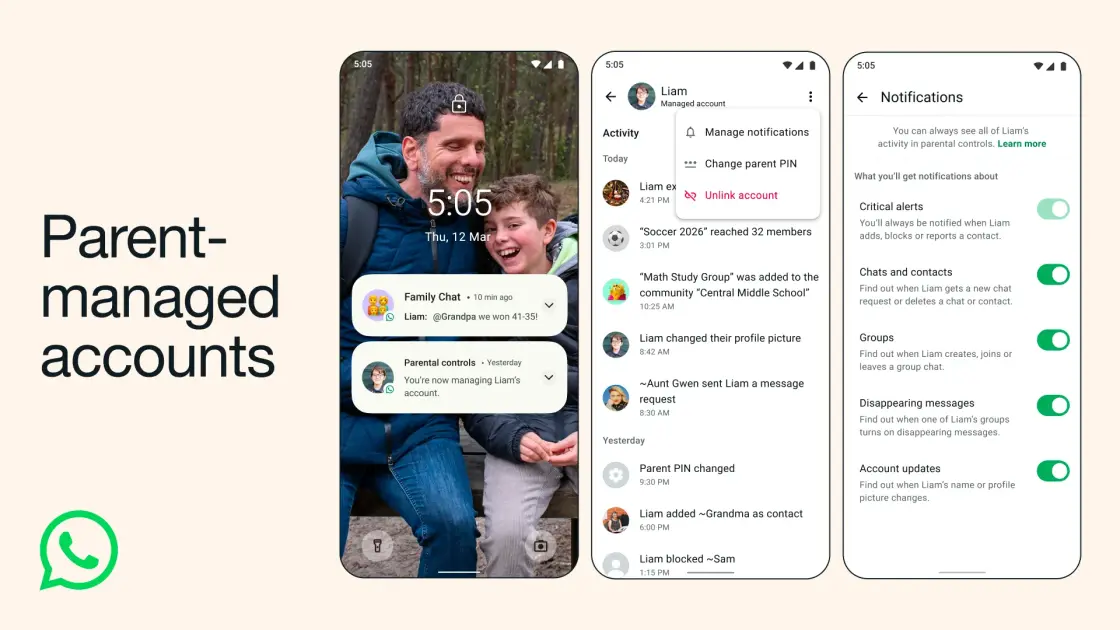
WhatsApp today unveiled parent-managed accounts for pre-teens, featuring new controls to limit pre-teens' WhatsApp experience to messaging and calling only. The feature is currently rolling out globally.
What Can Parents Control?
Parents set up the pre-teen's account and control it fully — deciding who can contact the account and which groups they can join. Parents can also review message requests from unknown contacts and manage the account's privacy settings. All of this is gated by a six-digit parent PIN on the managed account.
Step-by-Step Setup Guide
To set it up: download WhatsApp on your child's device, select "More options" when creating an account, then choose "Create a parent-managed account." Register and verify your child's number, enter their birthday and confirm their age. Then scan a QR code on their phone to link their WhatsApp account with yours and create your six-digit parent PIN. Note that the gradual rollout may mean some time before the feature becomes available in your region.
FAQs
CONTACT US
©2026 MobiTech Integrated Solutions. . All Rights Reserved