
Best Ways to Free Up Storage Space on Your Android Device (2026)
Best Ways to Free Up Storage Space on Your Android Device
Getting that "Storage Full" notification at the worst possible moment is one of the most frustrating experiences for any Android user. Your phone slows down, you can't install new apps, and you can't even take a photo. The good news is that the problem is almost always fixable — you just need to know where your storage is going and how to take it back.
Step One: Check What's Using Your Storage
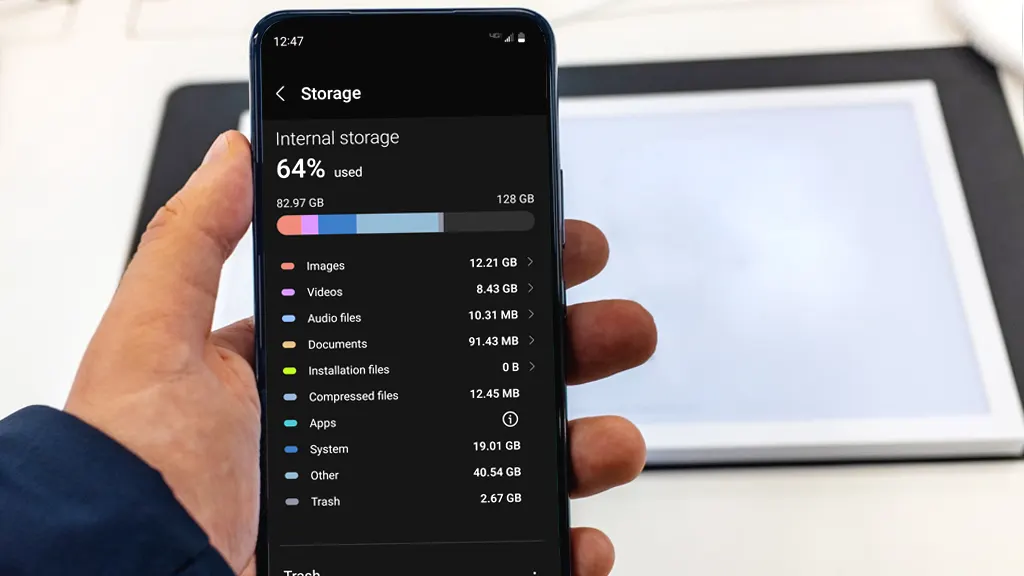
Before deleting anything, take a moment to understand where your storage is actually going. Go to Settings and tap Storage. You'll see a clear breakdown of what's taking up space — apps, photos, videos, files, and system data. This gives you a starting point so you can prioritize what to tackle first.
Step Two: Clear App Cache
Cache is temporary data that apps store to run faster, and it can quietly pile up into gigabytes over time. Heavy apps like YouTube, TikTok, and Spotify are usually the biggest offenders. To clear cache for any app, go to Settings, then Apps, select the app you want, tap Storage and Cache, and hit Clear Cache. You won't lose any personal data or settings — the app might just feel slightly slower the first time you open it after clearing, while it rebuilds its cache.
Step Three: Uninstall Apps You No Longer Use
Apps are typically the biggest storage consumers on any Android device, especially feature-heavy ones. Take a few minutes to scroll through your installed apps and ask yourself when you last opened each one. If it's been two or three months, you probably don't need it. Delete it — and remember, you can always reinstall it later for free if you paid for it originally.
Step Four: Clean Out Your Downloads Folder
Your Downloads folder is likely full of files you needed once and completely forgot about — PDFs, shared images, documents from WhatsApp or Telegram, and random attachments. Open your file manager or Files by Google, head to the Downloads folder, and clear out whatever you no longer need. While you're at it, check your messaging apps — WhatsApp and Telegram automatically save every photo and video sent to you, and those add up fast.
Step Five: Use Google Photos to Manage Your Media
Photos and videos are usually the biggest storage drain on any phone. The smartest move is to enable automatic backup in Google Photos, and once everything is safely backed up to the cloud, tap "Free up device storage" inside the app. This removes the local copies from your phone while keeping everything accessible online whenever you need it.
Step Six: Delete Offline Content from Streaming Apps
Netflix, Spotify, and YouTube all let you download content for offline viewing — and most people forget to delete it after they're done watching or listening. Go into the settings of each streaming app you use and remove any downloads you've already gone through. This single step can reclaim anywhere from 2 to 10 gigabytes depending on how much you've downloaded.
Step Seven: Use Files by Google
Files by Google is a free tool from Google that analyzes your device storage and shows you exactly where space is being wasted. It surfaces duplicate photos, forgotten screenshots, old downloaded files, and cache data that can be safely removed. It's one of the fastest ways to recover multiple gigabytes in just a few taps.
One Final Tip
Don't wait until you get a low storage warning to take action. Set a reminder every two or three months to clear cache, review your downloads, and check for apps you're no longer using. A little routine maintenance goes a long way in keeping your Android running smoothly all year round.
FAQs
CONTACT US
©2026 MobiTech Integrated Solutions. . All Rights Reserved